Fresh Fruit and Vegetables Vector Design for Versatile Use
Designers and creators often need high-quality visuals that are flexible, easy to edit, and scalable. The Fresh Fruit and Vegetables Vector Design offers exactly that. This set includes a variety of fruits and vegetables, all designed in vector format. Each element is placed on a separate layer, making it easy to customize and adapt for different projects. Whether you're a beginner or a professional, this design set provides the tools to bring your creative ideas to life.
What Makes This Design Set Stand Out
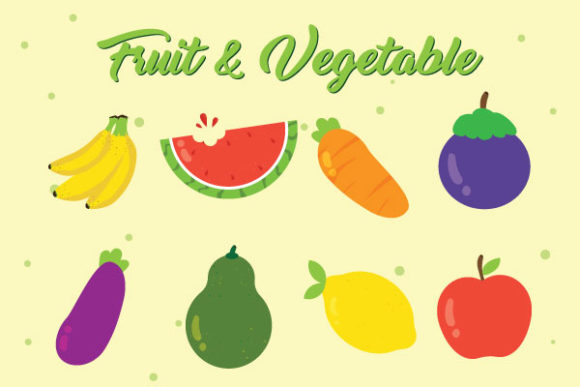
One of the main features of the Fresh Fruit and Vegetables Vector Design is its high quality. Because it's created in vector format, you can scale the images to any size without losing clarity. This makes it ideal for both digital and print use. The set includes 8 fruit icons, each with its own editable layers. This means you can adjust colors, shapes, and details to match your specific design needs.
The download includes two formats: an editable EPS 10 file and a JPG preview. The EPS file allows for deep customization using graphic design software like Adobe Illustrator. The JPG preview gives you a quick visual reference, perfect for checking layout or sharing with clients or team members who may not have vector editing tools.
Why This Design Set Is Valuable
For educators, small business owners, bloggers, and freelancers, having access to versatile design elements can make a big difference. The Fresh Fruit and Vegetables Vector Design supports a wide range of creative goals. It's especially useful for school projects, health-related materials, food blogs, and branding for organic or farm-to-table businesses.
Because the elements are layered separately, you can easily mix and match icons or remove certain parts to fit your layout. This level of customization is rare in many pre-made design sets, making this collection a valuable asset for anyone who works with visuals regularly.
Where and How to Use These Vector Designs
This design set is incredibly versatile. Here are a few practical applications:
- Education: Teachers can use the icons in lesson plans, infographics, or classroom posters about nutrition and healthy eating.
- Bloggers and Content Creators: Food bloggers can enhance their posts with high-quality images without the need for professional photography.
- Marketing and Branding: Small businesses in the health or food industry can incorporate these icons into packaging, logos, or social media graphics.
- Print Projects: Flyers, brochures, and recipe cards can all benefit from these scalable, clean illustrations.
- Digital Use: Web designers can integrate these icons into websites or mobile apps focused on wellness, cooking, or agriculture.
Because the vector files can be scaled infinitely without quality loss, you can use them in both small digital banners and large posters without any issues.
Getting Started with the Design Set
If you're new to working with vector files, don’t worry. The Fresh Fruit and Vegetables Vector Design is beginner-friendly. You can start by opening the EPS file in a program like Adobe Illustrator, Inkscape, or CorelDRAW. Once the file is open, you’ll see that each fruit or vegetable is on its own layer. This allows you to toggle visibility, edit individual elements, or group them together in new ways.
If you don’t have access to vector editing software, the included JPG preview is still useful for layout planning or placing in documents where high resolution isn’t critical. However, for full customization and scalability, using the EPS file is recommended.
Real-World Examples and Use Cases
Let’s look at a few real-world examples of how someone might use this design set:
- School Project: A student creates a nutrition chart for a science fair. They use the fruit icons to visually represent different vitamins found in each item.
- Health App: A startup building a wellness app uses the vector illustrations for icons representing food categories like fruits, vegetables, and superfoods.
- Local Farmers Market: A small business owner designs a weekly flyer using the illustrations to highlight seasonal produce.
- Recipe Blog: A food blogger creates a downloadable e-book of healthy breakfast ideas and uses the icons to visually separate each recipe section.
- Classroom Poster: A teacher prints a large poster showing the food pyramid, using the vector fruits and vegetables to make it engaging for students.
These examples show how the same design set can be adapted to suit different needs while maintaining a professional look.
Things to Consider Before Using
Before diving in, there are a few key points to keep in mind when working with the Fresh Fruit and Vegetables Vector Design:
- Software Compatibility: Make sure you have the right software to edit EPS files if you plan to customize the illustrations.
- Usage Rights: Check the licensing agreement included with your download to ensure it aligns with your intended use—especially for commercial projects.
- Design Consistency: If you're combining these icons with other graphics, ensure the style and color scheme match for a cohesive look.
- Resolution Needs: While the vector format ensures scalability, always confirm the resolution is appropriate for your final output, especially for print.
- Layer Management: Take time to organize the layers in your editing software to avoid confusion when making changes later.
By considering these factors, you’ll be better prepared to make the most of this design set and avoid common pitfalls.
Final Thoughts
The Fresh Fruit and Vegetables Vector Design is more than just a collection of pretty icons. It’s a practical, flexible tool that supports a wide range of creative and professional goals. Whether you're designing for a blog, a classroom, a business, or personal use, this set gives you the freedom to create clean, scalable visuals with ease. With its layered structure and high-quality vector format, it’s a smart addition to any designer’s toolkit—no matter your experience level.